
Free Tools for Creating 3D Virtual Tours

Download our professional software and start creating immersive 3D dollhouse property tours today
AI Align Tool Icon

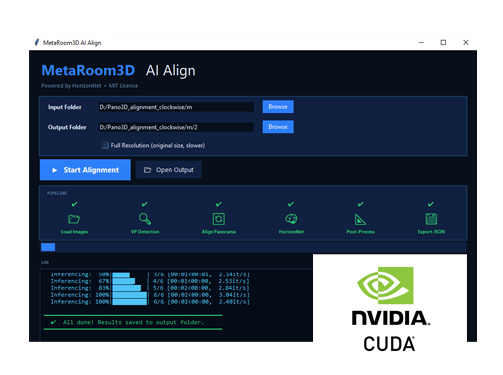
MetaRoom3D AI Align Tool

AI-powered automatic alignment tool for precise floor and wall placement in your 3D dollhouse models. Streamline your workflow with intelligent object detection and alignment.
  • Automatic floor boundary detection
  • AI-powered wall alignment
  • Batch process multiple rooms
  • Preview alignment before applying
  • Export alignment data
Version 1.0.0 Windows 10 1.02 GB
Download AI Align Tool
MetaRoom3D Editor Icon

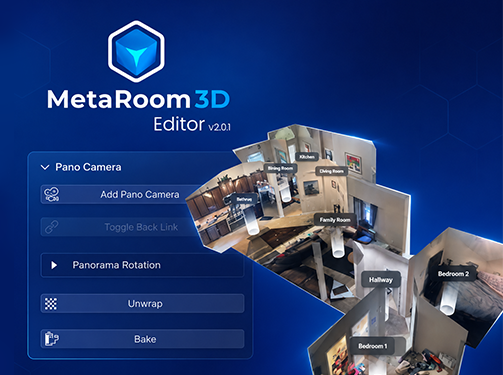
MetaRoom3D Editor v2.0.1

Blender plugin for creating 3D dollhouse models from panorama images. Transform your property photos into interactive 3D virtual tours with accurate floor plans.
  • Add panoramic camera positions
  • Toggle backface visibility
  • Panorama rotation controls
  • Automatic UV unwrapping
  • Export to .glb format
Version 2.0.1 Blender 4.5.2 LTS ~20 KB
Download Plugin
Hotspot Editor Icon

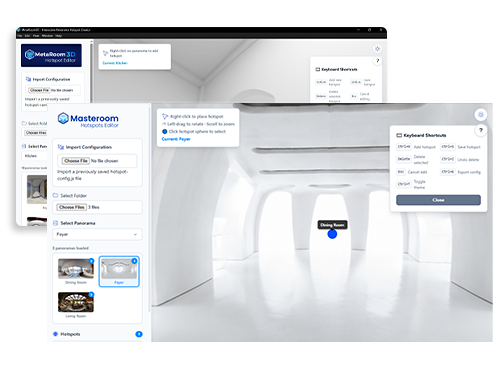
MetaRoom3D Hotspot Editor

Standalone software for adding navigation hotspots to your 3D dollhouse tours. Create seamless connections between rooms with interactive navigation points.

  • Load exported .glb files
  • Place navigation hotspots
  • Add room labels & info tags
  • Preview virtual tour
  • Export tour package
Version 1.0.0 Windows 10/11 91.5 MB
Download Editor

MetaRoom3D Editor Beginner Tutorial

Complete step-by-step guide to using the MetaRoom3D Editor plugin. Learn how to create professional 3D dollhouse virtual tours from your property photos.

What's Inside:

  • Installing Blender 4.5.2 LTS
  • Installing the MetaRoom3D Editor Plugin
  • Understanding the Plugin UI
  • Importing Panoramas & Aligning Floors
  • Extruding Walls & Creating Rooms
  • Adding Door Openings
  • Unwrapping Textures & Baking
  • Exporting as .glb
Beginner Guide PDF Document ~16 MB
📄 Download Tutorial PDF

How to Create Your First 3D Property Tour

1

Download Tools

Download MetaRoom3D Editor, AI Align Tool, and Hotspot Editor from this page.

2

Run AI Align Tool

Use the AI Align tool to automatically detect and align floor boundaries in your panoramas.

3

Follow the Tutorial

Read the beginner tutorial PDF to learn the complete workflow step by step.

4

Create Your Tour

Use your property photos to create an interactive 3D dollhouse in Blender.

5

Add Hotspots

Use the Hotspot Editor to add navigation between rooms.

6

Submit Your Tour

Export your project and submit it to MetaRoom3D.com for publishing.

System Requirements

MetaRoom3D Editor (Blender Plugin)

  • Blender Version: 4.5.2 LTS (recommended)
  • Operating System: Windows 10/11, macOS, Linux
  • RAM: 8 GB minimum (16 GB recommended)
  • Storage: 500 MB available space
  • Graphics: OpenGL 4.0+ compatible GPU

MetaRoom3D Hotspot Editor

  • OS: Windows 10 or Windows 11
  • Processor: Intel Core i5 or equivalent
  • RAM: 4 GB minimum (8 GB recommended)
  • Storage: 200 MB available space
  • Display: 1280x720 resolution or higher